How to Print Your NYSC Call-up Letter Easily (Step-by-Step Guide)
So, the time has finally come. You are done with final year clearance, your name successfully made it to the Senate list, and you are ready to become a “Corper.” But there is one last hurdle before you pack your white shorts and tennis shoes: knowing how to print your NYSC Call-up letter.
It’s a mix of excitement and anxiety, right? You are refreshing the portal every five minutes, wondering if you have been posted to Lagos, Abuja, or a state you’ve never seen on a map.
Don’t panic. Whether you are using your phone or a laptop, the process is straightforward—if the NYSC server behaves, of course.
If you are frantically searching for how to print your NYSC Call-up letter so you can head to camp, I’ve got you covered. Here is exactly what you need to do, stripped of all the technical jargon.

First: Did You Pay the N3,000?
Before we talk about printing, we need to address the payment issue. During your online registration, you had two choices:
-
Pay N3,000 to print your Call-up letter online.
-
Pay nothing and collect the Call-up letter from your school.
If you chose the second option (the free one), stop reading this guide and go to your school’s Student Affairs unit. You cannot print it online.
However, if you paid the N3,000, you have the luxury of printing it from your bedroom. This fee covers the convenience of accessing your letter from the dashboard immediately after deployment. It’s a small price to pay to avoid traveling back to your institution, especially if you graduated from one of the best universities in Nigeria for Medicine and have already moved back home.
Step-by-Step Guide to Print Your Letter
Okay, let’s get into the main business. Follow these steps carefully.
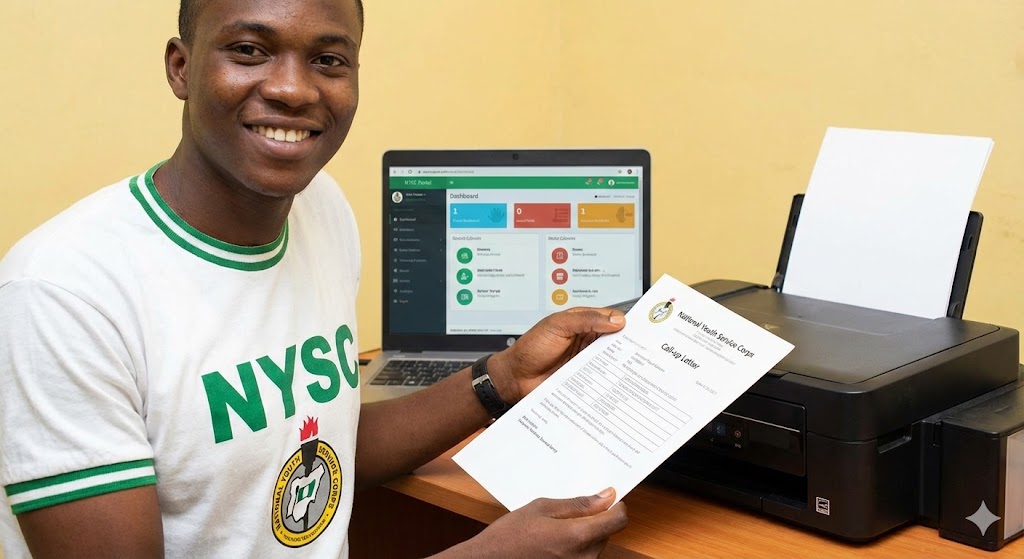
1. Visit the NYSC Portal Open your browser (Chrome or Firefox is best) and go to the official portal: portal.nysc.org.ng.
2. Login to Your Dashboard Click on “Login.” You will need the email address and password you used during registration. If you’ve forgotten your password, just use the “Resume Registration” or “Forgot Password” link to reset it.
3. Check Your Status Once you are logged in, scroll down. You are looking for a green button or a notification that says “Print Call-up Letter.”
4. Download and Print Click that button. Your device will download a PDF file. This is your ticket to the orientation camp.
If you are on a phone, do not just screenshot it. Download the PDF file and send it to a printer. You need a clear, colored copy.
Also, realize that this letter is different from the “Green Card.” The Green Card contains your bio-data, while the Call-up letter contains your state of deployment. You need both for camp registration.
Troubleshooting: Why Can’t I See My Letter?
Sometimes, you log in, and the “Print Call-up Letter” button is missing. It’s frustrating, I know. But here is usually why that happens:
-
You are in a different Stream: NYSC often splits batches into Stream I and Stream II. If you are in Stream II, your letter won’t show up until Stream I is done with their camping. You just have to wait.
-
The Site is Congested: When call-up letters are released, thousands of graduates are trying to login at once. The server might crash. If the page isn’t loading, try checking late at night or very early in the morning—similar to the strategy used when checking how to prepare for an exam in short time.
-
Browser Issues: Sometimes, your phone’s browser cache is the problem. Try using “Incognito Mode” or a different browser.
Important Tips for the “Otondo”
Don’t Print Just One Copy: This is a rookie mistake. Print at least 4-5 copies. You will submit some at the gate, some during registration, and some to your platoon officer. Keep the original safe.
Check the Details: Before you rush to celebrate, read the letter. Does the name match your school ID? Is the passport photograph clear? Mistakes here can cause major drama at the camp gate.
Safety First: The letter will contain the address of your orientation camp and the date you must report. If you are posted to a far state, plan your journey. Do not travel at night. As we often say in debates like education is better than money, knowledge is power—but safety is paramount.
Conclusion
Knowing how to print your NYSC Call-up letter is your first real step into the service year. It marks the transition from student to “Government Pickin.”
Take a deep breath. If the site is slow, be patient. Once you have that paper in your hand, the real adventure begins.
For more official updates regarding camp requirements and safety protocols, always refer to the official NYSC Facebook Page or the Vanguard News Education section for the latest headlines.
See you at the orientation camp!