How to Generate Profile Code for JAMB 2026: Fast & Easy Steps
Let’s be honest: JAMB registration season is one of the most stressful times for any Nigerian student. You have the pressure of reading for the exams, choosing the right university, and dealing with the fear of “village people” messing with your network.
But before you can even think of your exam center or your subject combination, you need one tiny but powerful thing: Your JAMB Profile Code.
Without this 10-digit number, you can’t buy the e-PIN. You can’t register. You basically can’t write JAMB.
I’ve seen so many smart students get stuck here. They send the message, get no reply, and start panicking. Or worse, they use their uncle’s SIM card and complicate their admission process for the next four years.
Don’t worry. I’m going to walk you through how to generate profile code for JAMB 2026 without the headache.
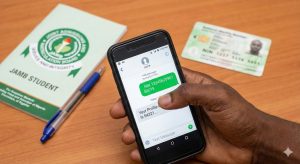
Quick Answer: How to Generate Your JAMB Profile Code
If you are in a hurry, here is the summary. To get your profile code:
-
Open the SMS app on your phone.
-
Type the word NIN, leave a SPACE, then type your 11-digit NIN. (e.g., NIN 00123456789)
-
Send this message to 55019 or 66019.
-
You will receive a 10-character profile code via SMS. Keep it safe!
Important Things You Must Know Before Sending That SMS
Before you rush to type on your phone, wait.
Every year, I see students waste N50 airtime over and over again because they missed a simple rule. If you want to generate your profile code on the first try, check these three things:
1. The SIM Card Rule (Crucial!)
You must use a SIM card that belongs to you.
Why? Because JAMB ties your admission data to that specific phone number. If you use your dad’s number or—God forbid—the number of the Cyber Cafe man, you are in trouble. All your admission updates, CAPS messages, and exam details will go to that number.
If you lose the SIM, you lose access to your JAMB profile. So, use an MTN, Glo, Airtel, or 9mobile line that is registered in your name (or a parent’s name that you have permanent access to).
2. You Must Have Airtime
This service isn’t free. The network providers charge N50 per SMS.
Pro Tip: Don’t just have exactly N50 on your phone. Sometimes, if your balance is too low (like N50.00 flat), the message fails. Load at least N100 just to be safe.
3. Your NIN Must Be Valid
JAMB relies 100% on the National Identity Management Commission (NIMC). If there is an error in your name on the NIMC database, that same error will appear on your JAMB profile. Fix your NIN issues first!
Step-by-Step: How to Generate Profile Code for JAMB 2026
Ready? Let’s do this. Follow these steps exactly.
Step 1: Open your text message app.
Step 2: Type the keyword NIN followed by a space.
-
Correct: NIN 12345678912
-
Wrong: NIN-12345678912
-
Wrong: NIN12345678912 (No space)
Step 3: Type your 11-digit NIN number (check your slip to be sure).
Step 4: Send the message to 55019.
Step 5: Wait for a response.
Usually, within 5 to 10 minutes, you should get a reply that looks like this: “Your Name is [EMMEKA ADEBAYO MUSA]. Your Profile Code is 1234567890. Use this code to purchase your e-PIN.”
What if 55019 doesn’t work?
Sometimes the 55019 network gets congested because thousands of students are trying at once. If you don’t get a reply after 20 minutes, try the backup code: 66019.
The format is exactly the same: NIN [SPACE] [Your NIN] to 66019.
Troubleshooting: “I Sent the Message But…”
This is where things get annoying. You did everything right, but JAMB sent you an error message instead of a code. Don’t panic. Here is how to fix the common errors I see students face.
1. Error: “Record not found” or “Invalid NIN”
This is scary, but usually fixable. It means JAMB’s computer cannot see your details on the NIMC server.
-
The Fix: You need to visit a NIMC enrollment center. Tell them your NIN isn’t verified. Sometimes, it’s just a backend network issue, and trying again after 24 hours solves it.
2. Error: “Insufficient Balance”
As I mentioned earlier, the networks are greedy.
-
The Fix: Recharge N100 or N200. Do not send “Please Call Me” or use bonus credit. It must be main airtime balance.
3. No Reply At All
You sent the text, they deducted your money, but you’ve seen shege—silence for 3 hours.
-
The Fix: Do not keep sending the SMS every 5 minutes; you will just burn your money. Wait for 3-4 hours. If still nothing, try the alternative number (66019). If that fails, contact JAMB support or create a ticket on the JAMB support website.
Why Is This Profile Code So Important? (Real-Life Application)
You might think, “It’s just a number.” No, it’s not.
Think of the Profile Code as your digital passport into the Nigerian tertiary education system. It links your biometric data (fingerprints and face) from NIMC directly to JAMB.
In the past, people could register with fake names or fix results easily. With the Profile Code system, your identity is locked. This code is what you will take to the bank or use on Remita to pay for your form. Without it, the bank teller won’t even look at you.
Also, you will use this same code to check your result, access your admission letter on CAPS, and even for regularization if you have issues later. Treat it like your ATM PIN.
Common Misconceptions (Stop Believing Rumors)
Myth: “I can use my brother’s NIN if mine isn’t ready.” Fact: No! If you use his NIN, his name appears on your exam slip. You cannot change this easily. You will end up writing the exam for your brother.
Myth: “I need to go to a CBT center to generate the code.” Fact: You don’t. You can do this from your bed. In fact, CBT centers often charge you extra for something you can do yourself. Go to the CBT center only after you have your code and e-PIN.
Myth: “I need a smartphone.” Fact: A “palasa” (torchlight phone) works perfectly fine. SMS is SMS.
The Exam Corner: Likely Questions & Tips
Since we are talking about preparation, here are a few quick tips regarding your registration data that often trip students up during the actual JAMB exam process.
-
Name Arrangement: JAMB usually arranges names as Surname, First Name, Middle Name. Ensure your NIN matches this order. If your NIN has your names scrambled, go to NIMC to update it before generating your code.
-
Date of Birth: If your profile comes back with a wrong Date of Birth, do not register! Fix it at NIMC first. Once you register with a wrong age, changing it is a long, expensive battle (indemnity forms, court affidavits—stress you don’t need).
Frequently Asked Questions (FAQ)
Q: Can I use the same profile code from last year (2025)? A: Generally, your profile code remains attached to your NIN. If you wrote JAMB last year and are rewriting, text the same command (NIN + Your NIN) to 55019. It should retrieve your existing profile code.
Q: I lost the SIM card I used last year. What do I do? A: This is a tough one. You must go to your network provider (MTN/Airtel/etc.) and do a “Welcome Back” (SIM Retrieval). You typically cannot change your phone number on the JAMB portal easily.
Q: Can I use a post-paid line? A: It’s safer to use a standard pre-paid line. Post-paid corporate lines sometimes block shortcode services like 55019.
Q: I made a mistake in my name on NIMC. Can JAMB correct it? A: No. JAMB picks whatever is on NIMC. You must correct it at the NIMC office. Once NIMC updates it, JAMB will see the correct details when you generate the code.
Generating your profile code is the first step of your journey to campus. It’s not difficult if you follow the rules: Your SIM, your NIN, and the right spacing.
Now, go get that code, buy your form, and start smashing those past questions! Good luck!