How to Link Email to JAMB Profile (2025 Guide): The Fast SMS Method
Let’s face it: dealing with the JAMB portal can be frustrating. You just want to check your admission status or print your result, but the system is asking for a password you don’t have yet.
Here is the thing: you cannot access the JAMB CAPS (Central Admission Processing System) or even print your original admission letter until you link a valid email address to your profile. Without this link, you are basically locked out of the most important part of your admission process.
If you are confused about how to link email to JAMB profile without spending money at a Cyber Cafe, you are in the right place. I’ve helped dozens of students fix this issue right from their phones.
It’s actually quite simple, but one small mistake—like a typo or using the wrong SIM—can cost you N50 airtime repeatedly.
Quick Answer: The SMS Code
Want to link your email fast? Here is the summary:
Pick up the phone with the SIM card you used for JAMB registration.
Open your SMS app.
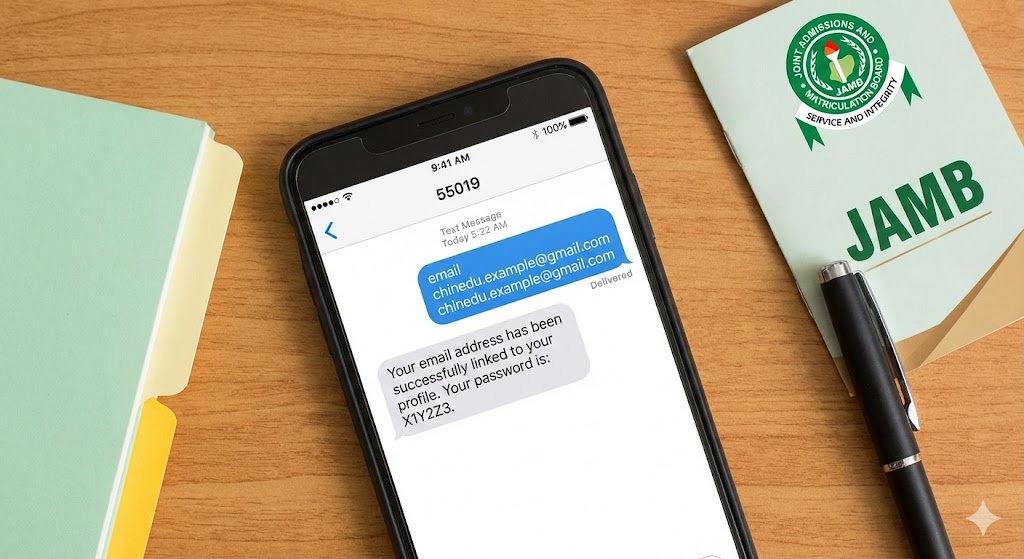
Type the word email, leave a SPACE, then type your email address twice (verify it is correct!).
Send it to 55019 or 66019.
Example: email chinedu.example@gmail.com chinedu.example@gmail.com
You will receive a 55019 message containing your portal password.
Why Do You Even Need to Do This?
You might be thinking, “I already have my profile code, why do I need to link email?”
Think of your JAMB profile code as your ID card, but your email link is the key to the office.
When you register for JAMB, you do most things biometrically. But after the exams, everything moves online to the JAMB e-Facility portal. This is where you will:
-
Accept or reject your admission on CAPS.
-
Print your result slip.
-
Apply for a change of course or institution.
If your email isn’t linked, you can’t log in. It’s that critical.
Step-by-Step: How to Link Email to JAMB Profile Via SMS
This is the standard method used for the 2025/2026 session. Follow these steps exactly to avoid wasting credit.
Step 1: Prepare Your SIM and Airtime
You must use the exact phone number you used to generate your profile code. If you use your daddy’s phone or a different line, you will get an error message saying the phone number is not valid for the candidate.
Also, have at least N100 airtime. The service costs N50, but sometimes if your balance is exactly N50, the network (MTN, Glo, Airtel, etc.) might block the transaction.
Step 2: Create a Fresh Email (Recommended)
This is a pro tip. I always tell my students to create a fresh Google (Gmail) account specifically for JAMB. Why? Because your personal email is likely full of junk mail, Facebook notifications, and spam. You don’t want your admission letter getting lost in that mess.
-
Go to Google and create a new account (e.g.,
jide.jamb2026@gmail.com). -
Write down the password immediately. If you lose this password, fixing it is a long “long thing.”
Step 3: Send the SMS
Now, type the message. Format: email [space] [your email address] [space] [your email address] Recipient: 55019
-
Example: email ciroma.chukwuma@gmail.com ciroma.chukwuma@gmail.com
Note: Previously, you only had to type the email once. But recently, typing it twice ensures there are no mistakes. If typing it twice fails, try the single format: email [space] [your email address].
Step 4: Save the Reply
Within a few minutes, you should get a reply from 55019. It will say: “Your email address has been successfully linked to your profile. Your password is: X1Y2Z3.”
Do not delete this text. That password is what you need to log in to the JAMB portal.
Troubleshooting: “I Sent the Text But It Didn’t Work”
I hear this complaint all the time. “Sir, they deducted my money but didn’t send the password.” It’s annoying, but here is how to fix it.
1. Try the Alternative Number
The 55019 shortcode is often congested because thousands of students are using it. If it fails, resend the same message to 66019. This is JAMB’s backup line.
2. Check Your Spelling
Did you write gamil.com instead of gmail.com? Did you put a comma instead of a dot? The system is a computer; it doesn’t understand “close enough.” It has to be perfect.
3. The “System Busy” Issue
Sometimes, the JAMB server is just down. If you don’t get a reply after 30 minutes, don’t keep sending messages every 5 minutes—you will just burn your airtime. Wait for a few hours, possibly until late at night when the network is less busy, and try again.
Common Mistakes to Avoid (The ‘Subtle Critique’)
I’ve seen smart students make avoidable errors that delay their admission. Don’t be one of them.
-
Using a Cyber Cafe’s Email: Never, ever do this. Sometimes, lazy cafe attendants will use their own master email to register ten students. This means you don’t have control over your profile. If that cafe closes down, or the guy forgets the password, you are stranded. Always use your own email.
-
Linking a School Email: Don’t use your secondary school email (if you have one). Once you leave that school, that email might be deactivated. Stick to Gmail or Yahoo.
-
Forgetting the Password: You will get a default password (like
Xy789) from JAMB. It’s usually hard to memorize. Immediately you log in for the first time, change it to something you can remember, like your surname and year of birth.
The Exam Corner: JAMB/Admission FAQ
Q: Can I change the email linked to my profile later? A: It is very difficult. Once you link an email, it becomes your unique identifier. To change it, you often have to visit a JAMB CBT center or the state office and pay for a correction. It’s better to get it right the first time.
Q: Is there a deadline for linking email? A: There isn’t a strict deadline, but you cannot access CAPS without it. Since admission processes start shortly after the exams, you should do it as soon as possible.
Q: I lost the SIM card I used for registration. What now? A: You need to do a “Welcome Back” (SIM retrieval) at your network provider’s office. You cannot link an email using a different phone number.
Final Words
Linking your email isn’t just a tech step; it’s about securing your admission. Without it, you are flying blind.
Take five minutes today, load that N100, and get it done. Once you have that password, log in to the portal and check that your O’Level results are uploaded correctly (that is another topic for another day!).
For more official updates, always keep an eye on the JAMB Official Website or reliable news sources like Punch Newspaper’s Education Section to know when new directives are released.
Good luck with your admission!